
Dexcom G6 warmup
The Dexcom G6 CGM is very convenient in the way it rarely needs calibrations. However it's not perfect. We provide a sensor code so the system knows which of 15 "batches" this sensor is part of, and this guides the auto-calibration. The transmitter takes a while for "warmup", and then starts giving us numbers. But I have learnt to not trust those numbers too soon!
I've written previously about Minimizing CGM gaps, where I use two transmitters and overlap the start of one sensor with the end of the previous, and only switch my system to use the new sensor when it becomes trustworthy. I started doing this with G5, but it's become even more important for me with G6.
In this example I have a lot of overlap. I started the new sensor early because I was concerned the old one might drop out. In fact the old one has continued to match fingerpricks and have low noise for days since! In the image shown here both CGM streams have been fed into a single Nightscout instance, where the comparisons are obvious!
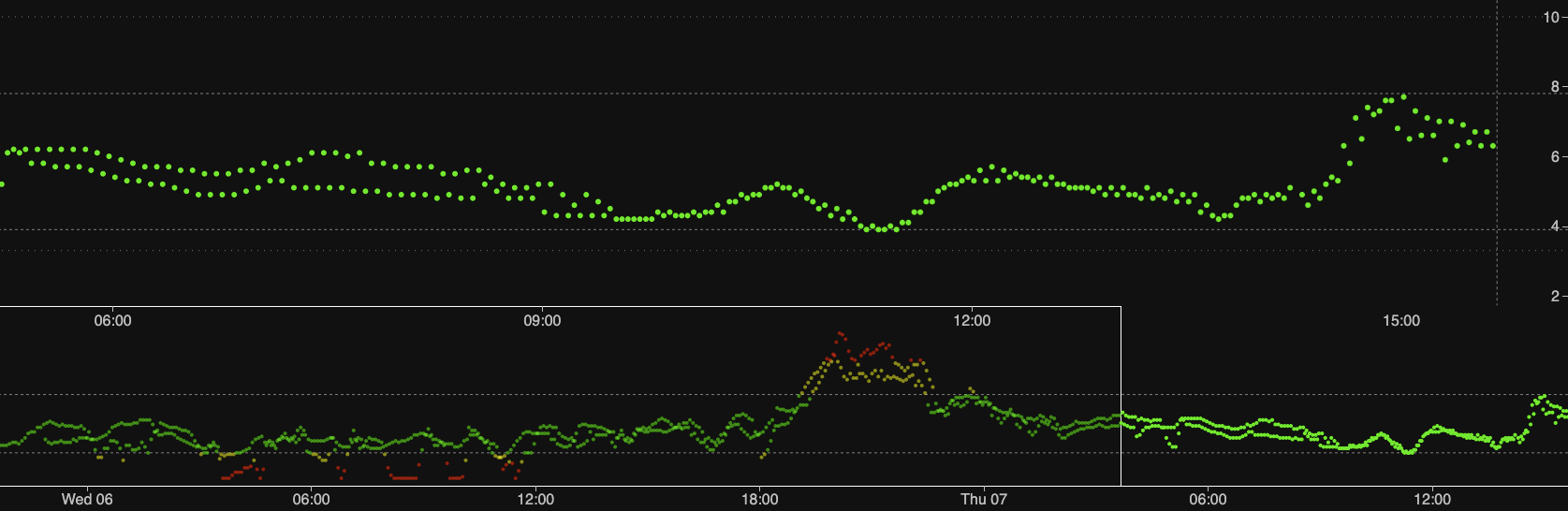
The green band on this graph is 3.9-7.8 mmol/L. The red low band starts at 3.3, and the red high band starts at 10.0.
You can zoom into the above image to see the detail, but here's some of the early wonkiness:

We don't expect the sensors to produce exactly the same values (in fact the almost solid line to the right is very surprising!). But it's taken somewhere between 13 and 30 hours for things to settle!
Just to be clear about which is which, here is just the old sensor.

They’re not all like this. Every now and then I get a sensor which is fairly solid from the get-go. But sometimes they take longer than this one!
If I didn't have my dual-sensor setup, whenever I started a new sensor I would find myself having to suspend my loop from making automatic adjustments to my insulin pump for most of a day. I'd probably also have to shut off CGM alarms for a while so I could get some sleep!